Projects and interviews in CLAD
Projects are containers for interviews. A researcher may have different projects (e.g. a project about a group of stutterers, a project about career management). The number of projects per user account is not limited. You can organize your work in whatever way you like. Each project can hold zero, or more interviews.
You can create a new project or select an existing one with the “Select/create a project” command on the right side of the page
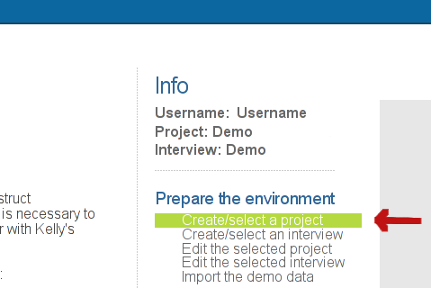
The command opens a screen which has two sections. One for creating a new project and one for selecting an existing project.
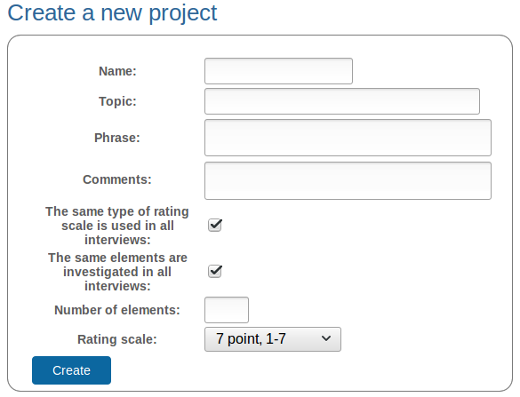
Creating a new project
The “Create a new project” section has the following options:
Name: Select a short name for the project. It should not be longer than fifteen characters. After the project is created this name can not be changed.
Topic: Write a statement on what the interviews within the project are about.
Phrase: The guiding phrase or phrases used in the interview(s).
Keep in mind that the topic and the guiding phrases will show up in CLAD every time you will add a construct, tie, or rate elements on the selected construct to remind you about the purpose of doing the interview.
The same type of rating scale is used in all interviews: The same kind of rating scale (e.g. a 7-point rating scale) is used for rating of elements on constructs in all interviews within the project. In case this option has not been selected, the type of rating scale is specified for each interview separately.
The same elements are investigated in all interviews: The same elements are used in all interviews that belong to the project. If this option is not selected, the examined elements are specified for each interview separately.
Number of elements: The number of elements you wish to consider in interviews belonging to the project. This input field is shown only in the case where The same elements are investigated in all interviews option is selected.
Rating scale: Select the type of rating scale appropriate for your project from the drop-down menu. This menu is shown only in the case where The same type of rating scale is used in all interviews has been selected.
Interviews within a project
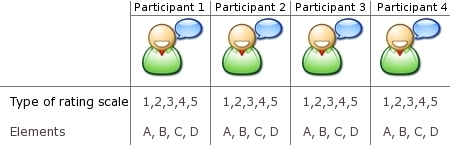
Interviews in a project may or may not share common properties: common rating scales, and/or common elements. On the one hand, you can create a project in which all interviews use the same elements (you are most likely using supplied elements) and the same type of rating scale for rating these elements on constructs. In this case, the project might look something like this. [1]
On the other hand, you can create a project where elements are determined on the interview level, and, in a similar fashion, each interview within the project may use a different type of rating scale for rating elements on constructs.
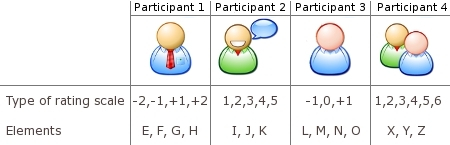
Of course, combinations of both approaches are possible. For example, you can create a project where all participants rate elements on the same type of rating scale, but elements are agreed for each interview separately.
Selecting an existing project
A user account contains no projects and interviews when it is created so the drop down menu list is empty. After a project has been created it is placed on the list of existing projects.
Importing the demo data
The demo data can be imported using the command “Import the demo data” in the menu. This data can be use to familiarize yourself with CLAD. This command can be reissued at any time. It will erase all modifications that you made to the demo date.
Footnotes
| [1] | Icons have been taken from David Vignoni’s Nuvola icon theme http://www.icon-king.com released under LGPL license. |