Handling ties in CLAD
Laddering, and also consistent laddering, is about a network of constructs. You have to add ties between pairs of constructs to form a network.
In Consistent Laddering ties can be weighted by their importance. Such weights are properties of ties. These weights indicate the importance of constructs in the context of their direct successors in the network.
Add a new tie
The “Add a new tie” command from the main menu, on the right side of the page, can be used to add a tie between a pair of constructs. Because the “Add a new tie” command is usually performed many times during an interview a shortcut to this command is provided in the top menu for the sake of convenience.
After the “Add a tie” command is issued, the “Add a tie ...” page is displayed.
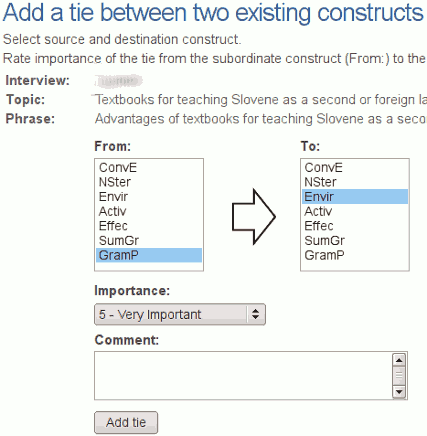
The page displays some general information relevant to the current interview: the name (code) of the interview, topic and guiding phrases...
Add a tie between a pair of constructs
To add a tie between a pair of constructs a source and destination must be selected. Please select a source (From:) and a destination (To:) from the lists of constructs that already exists for the interview.
Weight the selected tie
To weight the tie between a pair of constructs select an appropriate importance weight from the drop down menu. Possible options for importance weights are: 5 - “Very Important”, 4 - “Important”, 3 - “Moderately important”, 2 - “Of Little Importance”, and 1 - “Unimportant”.
You can also write down an optional comment related to the tie in question.
Select an existing tie
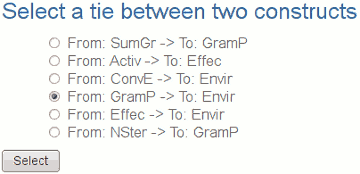
To edit or delete a tie it must be selected first. You can select a tie using “Select a tie” command from the main menu on the right side of the page. A tie can be selected from the list of ties that already exist in the network.
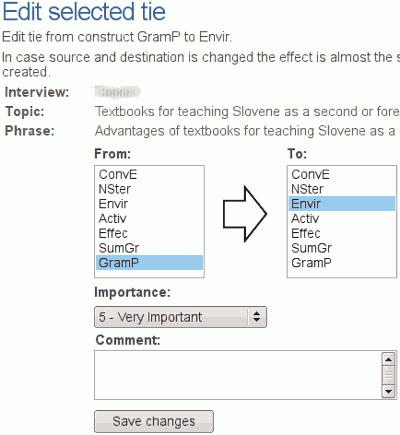
Edit the selected tie
Use “Edit the selected tie” command from the main menu on the right side of the page. You can change the source and destination of the tie and also the importance weight of the tie.
Delete the selected tie
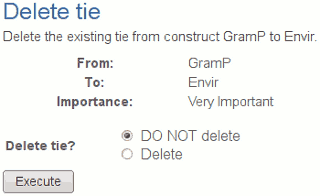
You can delete the selected tie using “Delete the selected tie” command. The command will display certain data connected to the selected tie. If you choose the “Delete” option and execute the command, the tie will be permanently deleted from the database.